Vibe Coding ERC-4337

AI development has been all over my timeline the last weeks. ERC-4337 has always interested me from a distance but I’ve never dived in to the code or details. Seemed like a good opportunity to see how I could leverage the available tools (in this case Cursor) to build something 4337 related.

ERC-4337 Playground is a playground that lets you simulate and debug ERC-4337 UserOperations, test account deployments, transactions, and see gas breakdowns. I “vibe coded” it while reading through ERC-4337 details and here’s some of what I learned.

ERC-4337 (Quickly)

There’s so many useful resources out there that give great detail. Here’s some of the ones I found most useful:

At a very high level, instead of a direct transaction from an EOA, an app builds a UserOperation that gets submitted to a bundler (off-chain service), which packages and submits it to the EntryPoint contract on-chain. This enables:

  • Smart contract wallets (no EOA required)
  • Batch transactions
  • Gas abstraction via paymasters
  • Account deployment on first use

The Account

What is it?

An Account is a smart contract that acts as a user’s wallet. Its basically a smart contract that can run logic on behalf of the user. Account has at least:

  • Validation logic, implementing `validateUserOp` for the EntryPoint (see below for more EntryPoint info)
  • An `execute(dest, value, func)` (or equivalent) to run the UserOp’s callData

How it fits in ERC-4337?

The sender in a UserOperation is the Account’s address.

The EntryPoint only talks to the Account through a fixed validation interface. The Account must implement `validateUserOp` (and related behavior) so the EntryPoint can:

  • Validate the UserOp (signature, nonce, etc.)
  • Charge for gas (prefund / deposit)
  • Optionally deploy the Account if it doesn’t exist yet (via initCode)

So: Account = the sender contract that implements the Account side of the ERC-4337 validation/execution interface.

How to deploy an account?

There is no global “EOA → Account” registry but there are various factory contract of Account implementation that can be used. The Account address is derived from:

  • Account factory (e.g. SimpleAccountFactory)
  • Owner (the EOA)
  • Salt (often 0 for the “default” account)

So “EOA X has an account” means: for some (factory, owner, salt), the contract at `factory.getAddress(owner, salt)` is deployed and initialized. The address is deterministically computed, but the account only exists after deployment.

In this app we get the address by calling getAddress on the factory.

Then use:

const bytecode = await client.getBytecode({

address,

});

to check if it has already been deployed. If not we give the option to deploy as part of the UserOperation (see below for a walk through).

EntryPoint

The EntryPoint is a singleton contract that validates and executes UserOperations in ERC-4337. It’s the standard’s core component and has been deployed across chains. The EntryPoint enables account abstraction by providing a standard interface for validating and executing UserOperations, without requiring changes to the Ethereum protocol.

This app uses EntryPoint v0.6, which is the current standard. Note that there are multiple EntryPoint versions (v0.6, v0.7) with different interfaces and behaviors so you should always verify which version your contracts and tooling support.

The app uses the EntryPoint to:

  • Simulate UserOperations via simulateValidation()
  • Fetch account nonces
  • Generate UserOperation hashes for signatures
  • Trace execution flows

Simulating UserOperations: Validation Without Execution

The app uses EntryPoint.simulateValidation() to validate a UserOperation without executing it. This checks signatures, nonces, deposits, and gas limits. simulateValidation() always reverts, even on success. This is because it’s designed as a view function that needs to return complex struct data. Since Solidity view functions have limitations on returning complex types, it uses a revert-with-data pattern, encoding the result in a custom error:

try {
  const { result } = await client.simulateContract({
    address: entryPointAddress,
    abi: ENTRYPOINT_V06_ABI,
    functionName: 'simulateValidation',
    args: [userOp],
  });
  // This path is never reached - simulateValidation always reverts!
} catch (simulateError) {
  // Success case: decode ValidationResult error
  if (decoded?.errorName === 'ValidationResult') {
    const returnInfo = decoded.args[0];
    // Extract: preOpGas, prefund, sigFailed, validAfter, validUntil
    return returnInfo;
  }
  // Failure case: decode actual error (FailedOp, etc.)
  throw simulateError;
}

This pattern leverages the EVM’s existing revert-with-data mechanism to return complex data. The app decodes the revert to extract validation results.

What simulation reveals

  • Gas usage: actual validation gas (preOpGas) vs. the provided verificationGasLimit
  • Signature status: whether signature validation passed
  • Deposit requirements: how much ETH must be deposited (prefund)
  • Time windows: validAfter and validUntil for time-based validation

Gas Estimation Limitations

Note: Simulated gas estimates may differ from actual on-chain execution due to state changes between simulation and execution, network conditions, bundler overhead, and other factors so you should always test with sufficient gas buffers in production.

When a paymaster is present, the app runs two simulations to separate account and paymaster validation gas:

// First: simulate without paymaster to get account-only gas
const resultWithoutPaymaster = await runSimulation(
  { ...userOp, paymasterAndData: '0x' },
  entryPointAddress
);
// Second: simulate with paymaster to get total gas
const resultWithPaymaster = await runSimulation(userOp, entryPointAddress);
// Calculate: paymasterGas = totalGas - accountGas

Tracing Execution: Following the Call Stack

Simulation validates; tracing shows what happens during execution. The app uses debug_traceCall with EntryPoint.simulateHandleOp() to capture the full call stack.

Why simulateHandleOp?

simulateHandleOp() runs both validation and execution, so the trace includes:

  • Validation phase: validateUserOp() and validatePaymasterUserOp()
  • Execution phase: `Account.execute()` and downstream calls

Note: Like simulateValidation, simulateHandleOp always reverts by design—the trace data comes from analyzing the execution before the revert.

const callData = encodeFunctionData({
  abi: ENTRYPOINT_V06_ABI,
  functionName: 'simulateHandleOp',
  args: [userOp, address(0), '0x'], // target and targetCallData allow additional calls during simulation; unused here
});
const traceResult = await client.request({
  method: 'debug_traceCall',
  params: [
    { to: entryPointAddress, data: callData },
    'latest',
    { tracer: 'callTracer' }
  ],
});

Building the call tree

The trace is a nested tree of contract calls. The app recursively parses it into a structured call stack:

function parseTraceFrame(frame, depth, entryPointAddress, senderAddress) {
  const { name } = getFunctionName(frame.input); // Decode function selector

  // Label contracts by role
  let contractLabel;
  if (frame.to === entryPointAddress) {
    contractLabel = 'EntryPoint';
  } else if (frame.to === senderAddress) {
    contractLabel = 'Account';
  } else if (frame.to === paymasterAddress) {
    contractLabel = 'Paymaster';
  }

  // Recursively parse child calls
  const children = frame.calls?.map(child =>
    parseTraceFrame(child, depth + 1, ...)
  );

  return {
    depth,
    to: contractLabel,
    functionName: name,
    gasUsed: frame.gasUsed,
    success: !frame.error,
    children, // Nested call tree
  };
}

This produces a tree showing:

  • EntryPoint → Account.validateUserOp()
  • EntryPoint → Paymaster.validatePaymasterUserOp() (if present)
  • EntryPoint → Account.execute()
  • Account → External contracts (transfers, approvals, etc.)

Working together

The app runs simulation first, then tracing:

// Step 1: Simulate validation
const result = await simulateUserOp(userOp, entryPointVersion, entryPointAddress);
if (result.success) {
  // Step 2: Trace execution (non-blocking)
  traceUserOp(userOp, entryPointAddress, rpcUrl)
    .then(trace => setTraceData(trace))
    .catch(err => console.warn('Trace failed:', err));
}

Why both?

  • Simulation: fast validation checks, gas estimates, and error detection
  • Tracing: detailed execution flow for debugging and understanding behavior

Together, they provide a complete view: whether the UserOperation will succeed and how it executes step-by-step.

Some Example Use Cases

The App highlights a couple of cool use cases for ERC-4337.

Deploying Accounts with initCode

In ERC-4337, accounts are deployed on demand using initCode. The EntryPoint checks if the account exists; if not, it uses initCode to deploy it before executing the operation.

initCode is the factory address concatenated with the encoded call to create the account:

export function encodeInitCode(factory: AccountFactory, owner: Address, salt: bigint): Hex {
  const createAccountData = encodeCreateAccount(factory, owner, salt);
  return concatHex([factory.address as Hex, createAccountData]);
}

The factory address comes first, followed by the encoded function call (e.g., createAccount(owner, salt)). The EntryPoint calls the factory with this data to deploy the account.

In this app, we check if the account is already deployed and only include initCode if it isn’t:

// Check if account exists by checking for bytecode
const bytecode = await client.getBytecode({
  address: accountSetup.computedAddress,
});
const isDeployed = !!(bytecode && bytecode !== '0x' && bytecode.length > 2);
// Only include initCode if account is not deployed
const initCode = isDeployed ? '0x' : encodeInitCode(accountSetup.factory, accountSetup.owner, accountSetup.salt);
const userOp: UserOperationV06 = {
  sender: accountSetup.computedAddress,
  nonce: toHex(nonce, { size: 32 }),
  initCode, // Empty if deployed, contains deployment data if not
  callData,
  // ... other fields
};

This enables account creation bundled with the first operation, reducing the number of transactions needed. The account creation still costs gas—it’s only ‘gasless’ if a paymaster covers the costs. This pattern eliminates the need for a separate deployment transaction.

How “Send 1 ETH” Works in ERC-4337

The “Send 1 ETH” button creates a UserOperation that sends 1 ETH from the smart contract account to Vitalik’s address, demonstrating ERC-4337 account abstraction.

When you click “Send 1 ETH”, the app:

1. Checks account deployment status – queries the computed address to see if the account contract exists

2. Fetches the nonce – if deployed, reads the current nonce from the EntryPoint contract:

nonce = await client.readContract({
  address: ENTRYPOINT_V06,
  abi: ENTRYPOINT_V06_ABI,
  functionName: 'getNonce',
  args: [accountSetup.computedAddress, 0n],
});

3. Encodes the execution call – encodes a call to the account’s execute function:

const callData = encodeExecuteCall(
  VITALIK_ETH_ADDRESS,  // destination
  parseEther('1'),      // 1 ETH value
  '0x'                  // empty calldata (simple ETH transfer)
);

This produces calldata for execute(address dest, uint256 value, bytes func).

4. Builds the UserOperation – constructs the UserOperation with:

  • sender: the account contract address
  • nonce: from EntryPoint (or 0 for new accounts)
  • initCode: factory deployment data if not deployed, otherwise ‘0x’
  • callData: the encoded execute call
  • Gas limits and fee parameters
  • signature: user signature

The UserOperation is then ready for simulation via EntryPoint.simulateValidation() or submission to a bundler (an off-chain service that packages UserOperations and submits them as transactions to the EntryPoint contract on-chain).

Naughty Naughty

One of my goals was to try and develop something useful but do it quickly and in my spare time. Building a small toy/MVP gave me a bit more freedom to use work arounds that wouldn’t be recommended in prod. I thought these were fairly interesting design choices to work around friction points that normally hinder development speed or user experience.

Anvil Signer Setup: Enabling Demo Signatures For Testing

This ERC-4337 UserOperation simulator needs valid signatures to test the full flow. Since it runs in the browser without wallet connections, it uses Anvil’s default test key to generate valid signatures for demos.

Why This Was Needed

UserOperations require valid signatures. Without a wallet, the app can’t sign. Using Anvil’s well-known test key (0xac0974bec39a17e36ba4a6b4d238ff944bacb478cbed5efcae784d7bf4f2ff80) lets the app sign UserOperations when the owner matches the corresponding address (`0xf39Fd6e51aad88F6F4ce6aB8827279cffFb92266), enabling end-to-end testing without wallet integration.

⚠️ SECURITY WARNING: NEVER use Anvil’s test private key in production or with real funds. This is a well-known private key that anyone can use to sign transactions. It should only be used in local development environments or demos with test networks. Using this key with real funds will result in immediate loss.

How It Works

The app checks if the owner address matches Anvil’s test address and if the user opted in. If both are true, it generates a valid signature; otherwise, it uses an invalid placeholder to surface validation errors.

// Check if owner matches Anvil's test address
const ownerMatchesAnvil = accountSetup.owner.toLowerCase() === ANVIL_TEST_ADDRESS.toLowerCase();
const shouldGenerateValidSignature = accountSetup.useValidSignature && ownerMatchesAnvil;
let signature: Hex;
if (shouldGenerateValidSignature) {
  // Generate valid signature using Anvil's private key
  signature = await generateUserOpSignature(userOpWithoutSig, ENTRYPOINT_V06);
} else {
  // Invalid signature to showcase validation errors
  signature = `0x${'0'.repeat(130)}`;
}

The signature generation uses Viem’s privateKeyToAccount to sign the UserOperation hash:

export async function generateUserOpSignature(
  userOp: UserOperationV06,
  entryPointAddress: Address,
  chainId: bigint = 1n
): Promise<Hex> {
  const account = privateKeyToAccount(ANVIL_TEST_PRIVATE_KEY);
  const userOpHash = getUserOpHash(userOp, entryPointAddress, chainId);

  return account.signMessage({
    message: { raw: userOpHash },
  });
}

This approach lets users test the full ERC-4337 flow with valid signatures while keeping the app wallet-free. Users can opt in via a checkbox when using the demo owner address, or use other addresses to see validation errors.

State Override: Simulating Without Funding Accounts

State Override lets us temporarily override account state (balance, code) during RPC calls. This playground uses it so users can simulate UserOperations without funding accounts on mainnet.

Important: State overrides only work during RPC calls for simulation purposes. They have no effect on actual on-chain state and are not part of the blockchain protocol. This is purely a development/debugging feature provided by some RPC providers.

The app applies a default balance override of 100 ETH to the sender account during simulations. This is passed through Viem’s simulateContract and debug_traceCall methods.

Here’s how it’s implemented:

const { result } = await client.simulateContract({
  address: entryPointAddress,
  abi: ENTRYPOINT_V06_ABI,
  functionName: 'simulateValidation',
  args: [/* userOp params */],
  stateOverride: [
    {
      address: userOp.sender as Address,
      balance: parseEther('100'), // 100 ETH override
    },
  ],
});

Conclusion

I initially set out to see how easy it would be to vibe code an Ethereum app from scratch with the hope of learning about ERC-4337 on the way. Turns out its super productive and fun!

The planning -> implementation loop of AI assisted development really helps to learn new concepts. For best results you have to be able to instruct the agent and that means having a clear understanding of what you want to achieve and how. And being able to quickly iterate as you figure stuff out meant I was always making progress rather than getting bogged down on silly implementation issues – I felt like I spent more quality time looking at 4337 related stuff.

I’ve only just touched on ERC-4337 really, so far it seems like there’s a lot that it can do although I can definitely see some devex issues. Plenty more to dive in to!

Oh and yeah…the AI overlords are coming/here to take our jobs! Or maybe more optimistically – software development is dead, long live software development! 😅


Building an SDK v1.0.1-beta.13 – Typechain

Intro

The TypeChain project provides developers a tool to generate TypeScript typings for smart contracts they are interacting with. This gives all the usual benefits of Typing for example – flagging an error if you try to call a function on the smart contract that doesn’t exist.

In the SDK we were using the @balancer-labs/typechain package which aims to provide TypeChain bindings for the most commonly used Balancer contracts but we decided it would be better to remove this dependency and generate the bindings as needed. This enables us to remain up to date with new contracts (e.g. Relayers) without waiting for the package support.

Making The Changes

TypeChain is really pretty easy to use but we had to add a few additonal changes to the SDK.

ABIs
To generate the typed wrapper TypeChain uses the Smart Contract ABIs. These were added in src/lib/abi. These can be found in the balancer-v2-monorepo or even from etherscan if the contract is already deployed/verified.

Targets
TypeChain will generate appropriate code for a given web3 library. In the SDK we use ethers.js so we need to make sure the @typechain/ethers-v5 package is added to our dev dependencies. (See the other available targets here)

CLI Command
To actually generate the files we need to run the typechain command and specifify the correct target, path to ABIs, and out path. For example:

typechain --target ethers-v5 --out-dir src/contracts './src/lib/abi/Vault.json'

Will target ethers and use the Vault ABI to generate the bindings in the src/contracts dir. You can see the full CLI docs here.

Its recommended that the generated file are not commited to the codebase so we add src/contracts/ to .gitignore. And in package.json a helper is added to scripts:

"typechain:generate": "npx typechain --target ethers-v5 --out-dir src/contracts './src/lib/abi/Vault.json' './src/lib/abi/WeightedPoolFactory.json' './src/lib/abi/BalancerHelpers.json' './src/lib/abi/LidoRelayer.json' './src/lib/abi/WeightedPool.json'"

and the CI is updated to call this command post install.

Updating the code
The last change to make was removing the old package and replacing any references to it. This is almost a direct replacement and just requires updating to use the path from the new contracts path. E.g.:

// Old
import { BalancerHelpers__factory } from "@balancer-labs/typechain";
// New
import { BalancerHelpers__factory } from '@/contracts/factories/BalancerHelpers__factory';

// Example of use
this.balancerHelpers = BalancerHelpers__factory.connect(
      this.contractAddresses.balancerHelpers,
      provider
    );

Example Of The Benefits

During the updates one of the benefits was highlighted. A previous example was incorrectly calling the queryExit function on the BalancerHelpers contract. This is a function that although it is used like a view it is actually a special case that requires it to be used with an eth_call (see here for more info). This led to a Type warning when trying to access the response. After correctly updating to use a callStatic the response typing matched the expected.

// Incorrect version
const response = await contracts.balancerHelpers.queryExit(...);
expect(response.amountsIn)....
// Shows: Property 'amountsIn' does not exist on type 'ContractTransaction'.

// Correct version
const response = await contracts.balancerHelpers.callStatic.queryExit
expect(response.amountsIn)....
/*
Shows:
const response: [BigNumber, BigNumber[]] & {
    bptOut: BigNumber;
    amountsIn: BigNumber[];
}
*/

Photo by Kristian Strand on Unsplash

Building an SDK v0.1.30 – Swaps With Pool Joins & Exits

In the Balancer Smart Order Router (SOR) we try to find the best “path” to trade from one token to another. Until recently we only considered paths that consisted of swaps but the Relayer allows us to combine swaps with other actions like pool joins and exits and this opens up new paths to consider.

Pools, Actions and BPTs

Lets take a look at the humble 80/20 BAL/WETH weighted balancer pool and see some of the associated actions.

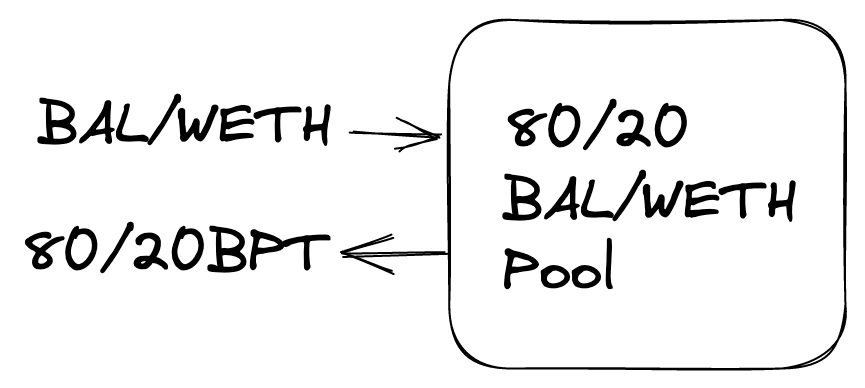
A token holder can join a Balancer pool by depositing tokens into it using the joinPool function on the vault. In return they receive a Balancer Pool Token (BPT) that represents their share in this pool. A user can join with a single token or a combination of tokens, as long as the tokens used already exist in the pool.

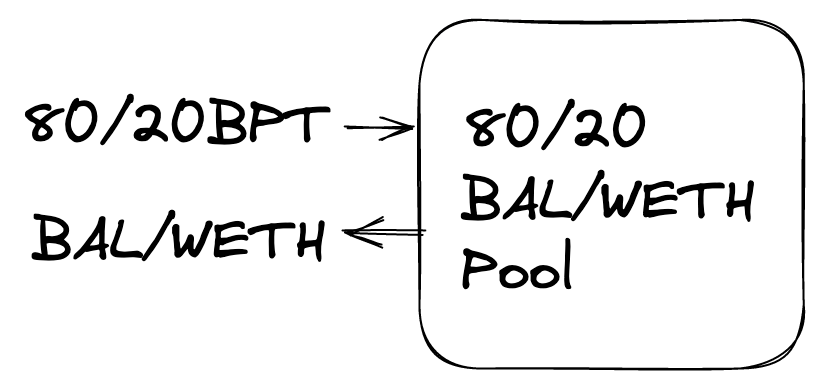
A BPT holder can exit the pool at anytime by providing the BPT back to the Vault using the exitPool function. And they can exit to one or a combination of the pool tokens.

In the Balancer veSystem users lock the BPT of the 80/20 BAL/WETH weighted balancer pool. This is cool because it ensures that even if a large portion of BAL tokens are locked, there is deep liquidity that can be used for swaps.

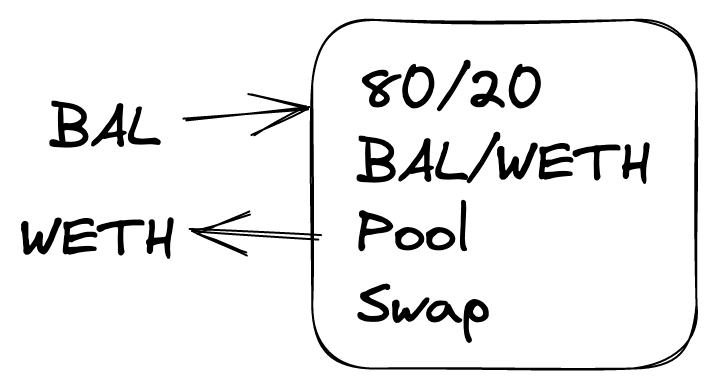
A swap against the 80/20 pool with a “normal” token swap would usually just involve swapping tokens that exist in the pool. e.g. swapping BAL to WETH. This can be achieved by calling the `Swap` function on the Balancer Vault.

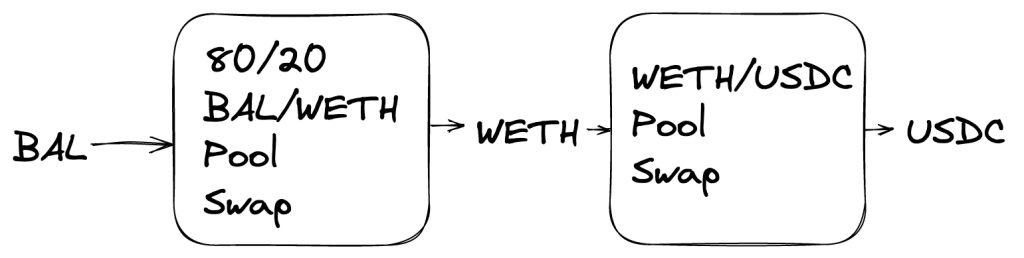
We also have multihop swaps that chain together swaps across different pools, which in Balancers case is super efficient because of the Vault architeture. This can be achieved by calling the `batchSwap` function on the Vault.

BPT tokens are actually an ERC20 compatible token which means they have the same approve, transfer, balance functionality as any other ERC20. This means it can itself also be a token within another Balancer pool. This opens up a whole world of interesting use cases, like Boosted Pools. Another example is the auraBal stable pool.

Aura

There’s lots of detailed info in the veBal and Aura docs but as a quick summary:

veBAL (vote-escrow BAL) is a vesting and yield system based based on Curves veCRV system. Users lock the 80/20 BPT and gain voting power and protocol rewards.

Aura Finance is a protocol built on top of the Balancer system to provide maximum incentives to Balancer liquidity providers and BAL stakers.

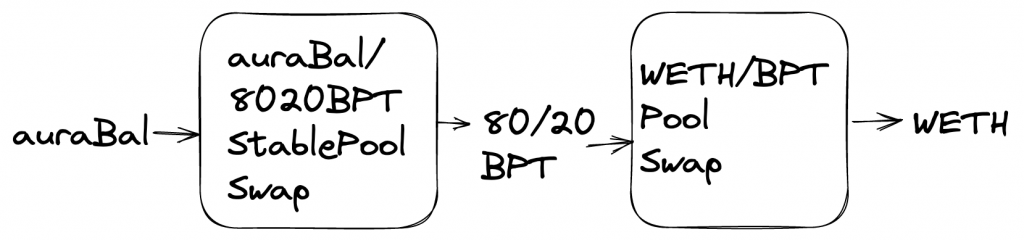
auraBAL is tokenised veBAL and the stable pool consists of auraBal and the 80/20BPT. Now if a user wants to trade auraBal to Weth they can do a multihop swap like:

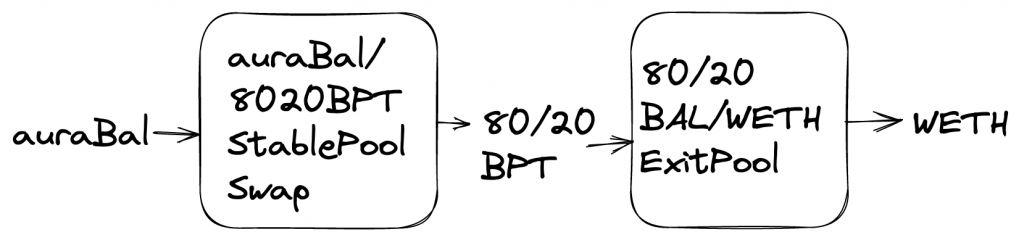
For larger trades this requires deep liquidity in the BPT/WETH pool, which in the Aura case hasn’t always been available. But there is another potential path, using a pool exit, that can make use of the deep liquidity locked in the 80/20 pool:

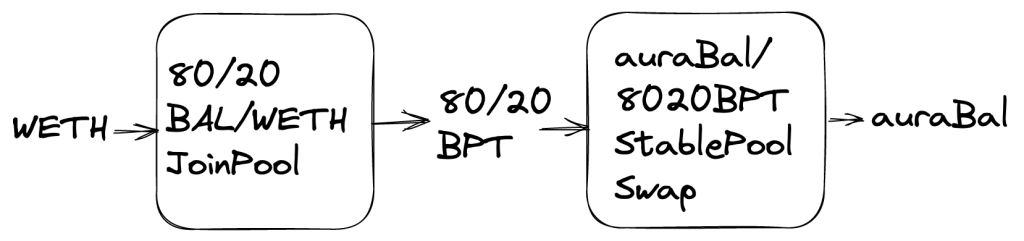
With the similar join path also being available:

Updating The Code

So we can see that adding support for these additional paths is definitely useful but it requires some changes to the existing code.

SOR Path Discovery

First we need to adapt the SOR so it considers join/exits as part of a viable path. An elegant and relatively easy to implement solution was suggested by Fernando. Some pools have pre-minted (or phantom) BPT which basically means the pool contains it’s own BPT in its tokens list. This means a swap can be used to trade to or from a pool token to join or exit, respectively. We can make the SOR consider non preminted pools in the same way by artificially adding the BPT to the pool token list.

        if (useBpts) {
            for (const pool of pools) {
                if (
                    pool.poolType === 'Weighted' ||
                    pool.poolType === 'Investment'
                ) {
                    const BptAsToken: SubgraphToken = {
                        address: pool.address,
                        balance: pool.totalShares,
                        decimals: 18,
                        priceRate: '1',
                        weight: '0',
                    };
                    pool.tokens.push(BptAsToken);
                    pool.tokensList.push(pool.address);
                }
            }
        }

We also have to make sure that each pool also has the relevant maths for BPT<>token swaps. Once these are added the SOR can create the relevant paths and will use the existing algorithm to determine the best price.

Call Construction

Paths containing only swaps can be submitted directly to the Vault batchSwap function. A combination of swaps with joins/exits can not – they have to be submitted via the Relayer multicall function. We wanted to try and keep the SOR focused on path finding so we added some helper functions to the SDK.

The first function `someJoinExit checks whether the paths returned from the SOR need to be submitted via the Vault (e.g. swaps only) or the Relayer (swaps and joins/exits). We can do this by checking if any of the hops involve a weighted pool with one of the tokens being the pool bpt. This works on the assumption that the weighted pools are not preminted.

// Use SOR to get swap information
const swapInfo = await sor.getSwaps(tokenIn, tokenOut, ...);
// Checks if path contains join/exit action
const useRelayer = someJoinExit(pools, swapInfo.swaps, swapInfo.tokenAddresses)

The second, buildRelayerCalls, formats the path data into a set of calls that can be submitted to the Relayer multicall function.

First it creates an action for each part of the path – swap, join or exit using getActions:

  // For each 'swap' create a swap/join/exit action
  const actions = getActions(
    swapInfo.tokenIn,
    swapInfo.tokenOut,
    swapInfo.swaps,
    swapInfo.tokenAddresses,
    slippage,
    pools,
    user,
    relayerAddress
  );

which use the isJoin and isExit functions:

// Finds if a swap returned by SOR is a join by checking if tokenOut === poolAddress
export function isJoin(swap: SwapV2, assets: string[]): boolean {  
  // token[join]bpt
  const tokenOut = assets[swap.assetOutIndex];
  const poolAddress = getPoolAddress(swap.poolId);
  return tokenOut.toLowerCase() === poolAddress.toLowerCase();
}

// Finds if a swap returned by SOR is an exit by checking if tokenIn === poolAddress
export function isExit(swap: SwapV2, assets: string[]): boolean {
  // bpt[exit]token
  const tokenIn = assets[swap.assetInIndex];
  const poolAddress = getPoolAddress(swap.poolId);
  return tokenIn.toLowerCase() === poolAddress.toLowerCase();
}

Then these actions are ordered and grouped. The first step is to categorize actions into a Join, Middle or Exit as this determines the order the actions can be done:

export function categorizeActions(actions: Actions[]): Actions[] {
  const enterActions: Actions[] = [];
  const exitActions: Actions[] = [];
  const middleActions: Actions[] = [];
  for (const a of actions) {
    if (a.type === ActionType.Exit || a.type === ActionType.Join) {
      // joins/exits with tokenIn can always be done first
      if (a.hasTokenIn) enterActions.push(a);
      // joins/exits with tokenOut (and not tokenIn) can always be done last
      else if (a.hasTokenOut) exitActions.push(a);
      else middleActions.push(a);
    }
    // All other actions will be chained inbetween
    else middleActions.push(a);
  }
  const allActions: Actions[] = [
    ...enterActions,
    ...middleActions,
    ...exitActions,
  ];
  return allActions;
}

The second step is to batch all sequential swaps together. This should minimise gas cost by making use of the batchSwap function. We use the batchSwapActions function to do this:

const orderedActions = batchSwapActions(categorizedActions, assets);

and it is essentially checking if subsequent swaps have the same source/destination – if they do then they can be batched together and the relevant assets and limits arrays are updated.

Each of the ordered actions are encoded to their relevant call data. And finally the Relayer multicall is encoded.

  const callData = balancerRelayerInterface.encodeFunctionData('multicall', [
    calls,
  ]);

And here’s a full example showing how the new functions can be used:

/**
* Example showing how to find a swap for a pair using SOR directly
* - Path only uses swaps: use queryBatchSwap on Vault to see result
* - Path use join/exit: Use SDK functions to build calls to submit tx via Relayer
*/
import dotenv from 'dotenv';
import { BigNumber, parseFixed } from '@ethersproject/bignumber';
import { Wallet } from '@ethersproject/wallet';
import { AddressZero } from '@ethersproject/constants';
import {
BalancerSDK,
Network,
SwapTypes,
someJoinExit,
buildRelayerCalls,
canUseJoinExit,
} from '../src/index';
import { ADDRESSES } from '../src/test/lib/constants';
dotenv.config();
async function getAndProcessSwaps(
balancer: BalancerSDK,
tokenIn: string,
tokenOut: string,
swapType: SwapTypes,
amount: BigNumber,
useJoinExitPaths: boolean
) {
const swapInfo = await balancer.swaps.sor.getSwaps(
tokenIn,
tokenOut,
swapType,
amount,
undefined,
useJoinExitPaths
);
if (swapInfo.returnAmount.isZero()) {
console.log('No Swap');
return;
}
// console.log(swapInfo.swaps);
// console.log(swapInfo.tokenAddresses);
console.log(`Return amount: `, swapInfo.returnAmount.toString());
const pools = balancer.swaps.sor.getPools();
// someJoinExit will check if swaps use joinExit paths which needs additional formatting
if (
useJoinExitPaths &&
someJoinExit(pools, swapInfo.swaps, swapInfo.tokenAddresses)
) {
console.log(`Swaps with join/exit paths. Must submit via Relayer.`);
const key: any = process.env.TRADER_KEY;
const wallet = new Wallet(key, balancer.sor.provider);
const slippage = '50'; // 50 bsp = 0.5%
try {
const relayerCallData = buildRelayerCalls(
swapInfo,
pools,
wallet.address,
balancer.contracts.relayerV3!.address,
balancer.networkConfig.addresses.tokens.wrappedNativeAsset,
slippage,
undefined
);
// Static calling Relayer doesn't return any useful values but will allow confirmation tx is ok
// relayerCallData.data can be used to simulate tx on Tenderly to see token balance change, etc
// console.log(wallet.address);
// console.log(await balancer.sor.provider.getBlockNumber());
// console.log(relayerCallData.data);
const result = await balancer.contracts.relayerV3
?.connect(wallet)
.callStatic.multicall(relayerCallData.rawCalls);
console.log(result);
} catch (err: any) {
// If error we can reprocess without join/exit paths
console.log(`Error Using Join/Exit Paths`, err.reason);
await getAndProcessSwaps(
balancer,
tokenIn!,
tokenOut!,
swapType,
amount,
false
);
}
} else {
console.log(`Swaps via Vault.`);
const userAddress = AddressZero;
const deadline = BigNumber.from(`${Math.ceil(Date.now() / 1000) + 60}`); // 60 seconds from now
const maxSlippage = 50; // 50 bsp = 0.5%
const transactionAttributes = balancer.swaps.buildSwap({
userAddress,
swapInfo,
kind: 0,
deadline,
maxSlippage,
});
const { attributes } = transactionAttributes;
try {
// Simulates a call to `batchSwap`, returning an array of Vault asset deltas.
const deltas = await balancer.contracts.vault.callStatic.queryBatchSwap(
swapType,
swapInfo.swaps,
swapInfo.tokenAddresses,
attributes.funds
);
console.log(deltas.toString());
} catch (err) {
console.log(err);
}
}
}
async function swapExample() {
const network = Network.MAINNET;
const rpcUrl = `https://mainnet.infura.io/v3/${process.env.INFURA}`;
const tokenIn = ADDRESSES[network].WETH.address;
const tokenOut = ADDRESSES[network].auraBal?.address;
const swapType = SwapTypes.SwapExactIn;
const amount = parseFixed('18', 18);
// Currently Relayer only suitable for ExactIn and non-eth swaps
const canUseJoinExitPaths = canUseJoinExit(swapType, tokenIn!, tokenOut!);
const balancer = new BalancerSDK({
network,
rpcUrl,
});
await balancer.swaps.sor.fetchPools();
await getAndProcessSwaps(
balancer,
tokenIn!,
tokenOut!,
swapType,
amount,
canUseJoinExitPaths
);
}
// yarn examples:run ./examples/swapSor.ts
swapExample();
view raw SwapExample.ts hosted with ❤ by GitHub

Photo by Jakob Owens on Unsplash

Building an SDK v0.1.24 – Balancer Relayers and Pool Migrations

What Is A Relayer?

A relayer is a contract that is authorized by the protocol and users to make calls to the Vault on behalf of the users. It can use the sender’s ERC20 vault allowance, internal balance and BPTs on their behalf. Multiple actions (such as exit/join pools, swaps, etc) can be chained together which improves the UX.

For security reasons a Relayer has to be authorised by the Balancer DAO before it can be used (see previous votes for V1 and V2) and even after authorisation each user would still be required to opt into the relayer by submitting an approval transaction or signing a message.

How It Works

Contracts

The Balancer Relayers are composed of two contracts, BalancerRelayer, which is the single point of entry via the multicall function and a library contract, such as the V3 VaultActions, which defines the allowed behaviour of the relayer, for example – VaultActions, LidoWrapping, GaugeActions.

Having the multicall single point of entry prevents reentrancy. The library contract cannot be called directly but the multicall can repeatedly delegatecall into the library code to perform a chain of actions.

Some psuedo code demonstrating how an authorisation, exitPool and swap can be chained and called via the multicall function:

const approval = buildApproval(signature); // setRelayerApproval call
const exitPoolCallData = buildExitPool(poolId, bptAmt); // exitPool call
const swapCallData = buildSwap(); // batchSwap call

const tx = await relayer.multicall([approval, exitPoolCallData, swapCallData]);

Approval

A user has to approve each Relayer before they can use it. To check if a Relayer is approved we can use hasApprovedRelayer on the Vault:

const isApprove = await vault.hasApprovedRelayer(userAddress, relayerAddress)

And we can grant (or revoke) approval for a given relayer by using setRelayerApproval:

const approvalTx = await vault.setRelayerApproval(userAddress, relayerAddress, isApprove);

A Relayer can also be approved by using the setRelayerApproval function from the BaseRelayerLibrary contract. Here a signed authorisation message from the user is passed as an input parameter. This allows an approval to be included at the start of a chain of actions so the user only needs to submit a single transaction creating a better UX.

Chained References

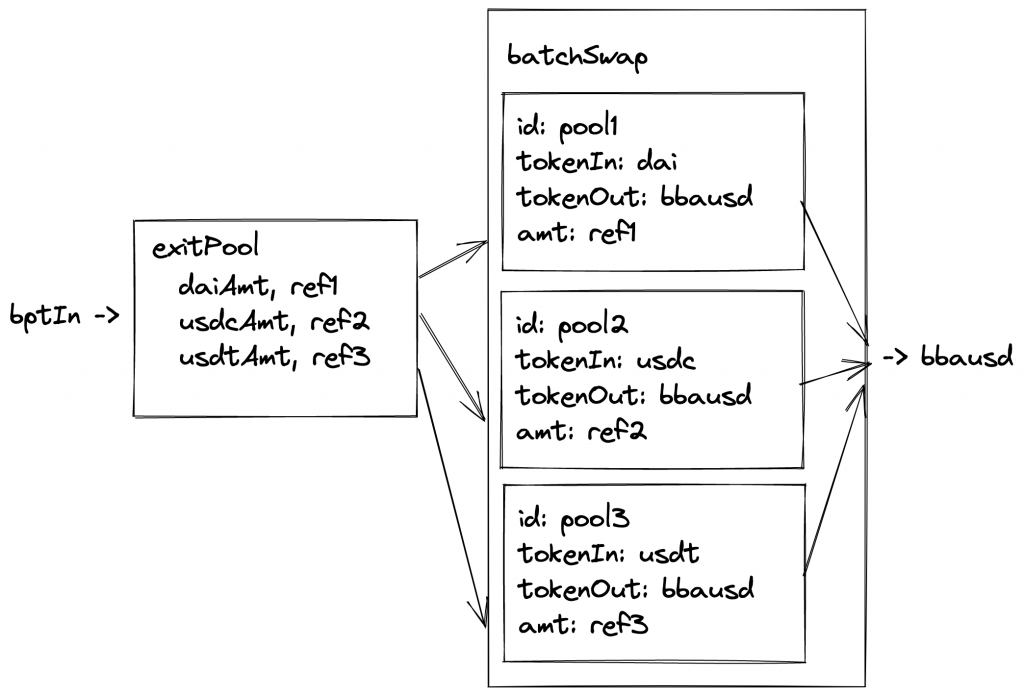
Output References allow the Relayer to store output values from once action which can then be read and used in another action. This allows us to chain together actions. For example we could exit a pool, save the exit amounts of each token to a reference and then do a batchSwap using the references as input amounts for each swap:

An OutputReference consists of an index and a key:

struct OutputReference {
  uint256 index;
  uint256 key;
}

Where the key is the slot the value will be stored at. Index indicates which output amount should be stored. For example if exitPool exits to 3 tokens, DAI (index 0), USDC (1), USDT (2), we would want to use index 0 to store DAI, 1 for USDC, etc.

Example Use Case – Pool Migration

Intro

Balancer aims for the best capital efficiency for LPs so it made sense to offer the option to migrate from the old “staBal3” pool consisting of DAI, USDC and USDT to a new “boosted” stable pool which is more capital efficient because it uses yield bearing assets.

To migrate between these pools would take multiple steps:

  1. unstake from staBal3 gauge → staBalBpt
  2. exitPool from staBal, staBalBpt → DAI, USDC, USDT
  3. join the bb-a-usd2 pool by using batchSwaps
    1. DAI → bbausd2Bpt
    2. USDC → bbausd2Bpt
    3. USDT → bbausd2Bpt
  4. stake bbausd2Bpt in gauge

This would be quite an ordeal for a user to do manually but the Relayer can be used to combine all these actions into a single transaction for the user.

Details

As this is a well defined one off action we decided to add this function to the SDK as a “Zap” under a Migrations module. The user can call the staBal3 function to get all the call data required to call the tx:

{ to, data } = migrations.stabal3(
  userAddress,
  staBal3Amount,
  minBbausd2Out,
  isStaked,
  authorisationSignature
);

Behind the scenes all the call data for each step is crafted and the encoded multicall data is returned:

calls = [
        this.buildSetRelayerApproval(authorisation),
        this.buildWithdraw(userAddress, staBal3Amount),
        this.buildExit(relayer, staBal3Amount),
        this.buildSwap(minBbausd2Out, relayer),
        this.buildDeposit(userAddress),
      ];

const callData = balancerRelayerInterface.encodeFunctionData('multicall', [
      calls,
    ]);

buildSetRelayerApproval allows the user to pass the approval signature if this is their first time using the relayer. This allows us to approve and execute the migration all in a single transaction.

buildWithdraw and buildDeposit handle the gauge actions. The initial call is to withdraw from the staBal gauge and the final call deposits the bbausd2 bpt into the new gauge. We withdraw directly to the Relayer address rather than the users. The gauges return the tokens to the caller, so sending them to the user costs more as we need to manually transfer them:

gauge.withdraw(amount);
// Gauge does not support withdrawing BPT to another address atomically.
// If intended recipient is not the relayer then forward the withdrawn BPT on to the recipient.
if (recipient != address(this)) {
    IERC20 bptToken = gauge.lp_token();
    bptToken.transfer(recipient, amount);
}

Skipping this has two benefits. Firstly it saves gas by avoiding an extra transfer. It also avoids approval issues as now the Relayer is just using its own funds. The final deposit uses the userAddress to send the staked tokens from the Relayer back to the user.

buildExit creates the exitPool call:

// Ask to store exit outputs for batchSwap of exit is used as input to swaps
    const outputReferences = [
      { index: assetOrder.indexOf('DAI'), key: EXIT_DAI },
      { index: assetOrder.indexOf('USDC'), key: EXIT_USDC },
      { index: assetOrder.indexOf('USDT'), key: EXIT_USDT },
    ];

    const callData = Relayer.constructExitCall({
      assets,
      minAmountsOut: ['0', '0', '0'],
      userData,
      toInternalBalance: true,
      poolId: this.addresses.staBal3.id,
      poolKind: 0, // This will always be 0 to match supported Relayer types
      sender,
      recipient: this.addresses.relayer,
      outputReferences,
      exitPoolRequest: {} as ExitPoolRequest,
    });

Output references are used to store the final amounts of each stable token received from the pool. We have precomputed the keys by using the Relayer.toChainedReference helper, like:

const EXIT_DAI = Relayer.toChainedReference('21');
const EXIT_USDC = Relayer.toChainedReference('22');
const EXIT_USDT = Relayer.toChainedReference('23');

These will be used later as inputs to the swaps.

Also of interest is the fact we set toInternalBalance to true. The Balancer V2 vault can accrue ERC20 token balances and keep track of them internally in order to allow extremely gas-efficient transfers and swaps. Exiting to internal balances before the swaps allows us to keep gas costs down.

Because we have previously exited into internal balances we also don’t have to worry about the users having previously approved the Relayer for the tokens:

if (fromInternalBalance) {
// We take as many tokens from Internal Balance as possible: any remaining amounts will be transferred.
uint256 deductedBalance = _decreaseInternalBalance(sender, token, amount, true);
// Because deductedBalance will be always the lesser of the current internal balance
// and the amount to decrease, it is safe to perform unchecked arithmetic.
amount -= deductedBalance;
}

if (amount > 0) {
token.safeTransferFrom(sender, address(this), amount);
}

so the amount will be 0 and the safeTransferFrom call will not be executed.

buildSwap – We can join bbausd2 using a swap thanks to the PhantomBpt concept so here we create a batchSwap call that swaps each stable token to the bbausdBpt and we use the output references from the exitPool call as the input amounts to the swap (which is great as we don’t need to precompute these).

const swaps: BatchSwapStep[] = [
    {
      poolId: this.addresses.linearDai2.id,
      assetInIndex: 1,    // DAI
      assetOutIndex: 2,   // bDAI
      amount: EXIT_DAI.toString(),
      userData: '0x',
    },
    {
      poolId: this.addresses.bbausd2.id,
      assetInIndex: 2,  // bDAI
      assetOutIndex: 0,  // bbausd2
      amount: '0',
      userData: '0x',
    }
    ...
    {
      poolId: this.addresses.linearUsdc2.id,
      assetInIndex: 3,  // USDC
      assetOutIndex: 4, // bUSDC
      amount: EXIT_USDC.toString(),
      userData: '0x',
    },
    ...

In the Relayer VaultActions contract we can see how the swap amounts are set to the value stored in the reference:

for (uint256 i = 0; i < swaps.length; ++i) {
	uint256 amount = swaps[i].amount;
  if (_isChainedReference(amount)) {
	  swaps[i].amount = _getChainedReferenceValue(amount); //e.g. EXIT_DAI
  }
}

And finally (😅) we use another output reference to store the total amount out of bbausd2:

const outputReferences = [{ index: 0, key: SWAP_RESULT_BBAUSD }];

This is used as an input to the final gauge deposit to make sure we stake all the BPT that we have received and that should conclude the migration! You can see this in action on a local fork (yay no real funds required!) by running the integration test here.

Conclusion

The Balancer Relayer is probably not that well known so hopefully this has given a good overview of some of its functionality and flexibility. There’s a lot of room for experimentation and improvement of UX for complex operations so its worth investigating!

Photo by Austrian National Library on Unsplash

Building an SDK 0.1.14 – Adding a Contracts module

Intro

The idea of adding this was to make accessing Balancer contracts easier for users. Normally you need to find and import ABIs and deal with deployment addresses, if we want to make it easy we should just remove that complexity.

Also we are trying to make the main SDK functions return the contract name and functions as part of the attributes returned. This means the user could then just call using something like:

const { contractName, functionName, attributes } = transactionAttributes;

sdk.contracts[contractName][functionName](attributes)

Typechain

Typechain is a package that provides TypeScript bindings for Ethereum contracts. This means functions are statically typed and there is also IDE support which makes things safer and easier to develop against.

Balancer has its own @balancer-labs/typechain package that exposes instances of the commononly used contracts. Adding this to the SDK means we can remove the need to import ABI jsons and we can now create instances of contracts by doing:

import {
    Vault__factory
} from '@balancer-labs/typechain';

Vault__factory.connect(
            this.networkConfig.addresses.contracts.vault,
            provider
        );

which will return a typed Vault contract.

Module

  • Uses BALANCER_NETWORK_CONFIG and config.network to find vault/lidoRelayer/multicall addresses.
  • Added contracts getter to SDK module:
constructor(
        public config: BalancerSdkConfig,
        public sor = new Sor(config),
        public subgraph = new Subgraph(config),
        public pools = new Pools(config),
        public balancerContracts = new Contracts(config, sor.provider)
    ) { ... }

get contracts(): ContractInstances {
        return this.balancerContracts.contracts;
    }

This can then be called like:

const vaultContract = balancer.contracts['vault'];

or:

const vaultContract = balancer.contracts.vault

which will provide typed function refs.

Tradeoffs

One interesting discussion is the trade off of using the Contracts module within other modules. As of now only the Swaps and Multicaller modules using contracts. Using the Contracts module means we either have to pass Contracts in constructor, which adds an extra step if someone want to use modules independently:

const contracts = new Contracts(config)
const swaps = new Swaps(config, contracts)

or we instantiate Contracts within the module – which ends up happening twice if we use the high level SDK function as it is also instantiated there. For now we have decided to use the Typechain factories to instantiate the contracts within the module and will revisit in future if needed.

Photo by Pablo Arroyo on Unsplash

Building an SDK 0.1.0 – Improving SOR data sourcing

Intro

A big focus for Balancer Labs this year is to make it really easy to build on top of the protocol. To aid in that we’re putting together the `@balancer-labs/sdk npm package. As the current lead in this project I thought I’d try and document some of the work to help keep track of the changes, thought process and learning along the way. It’ll also be useful as a reminder of what’s going on!

SOR v2

Some background

We already have the Smart Order Router (@balancer-labs/sor), a package that devs can use to source the optimal routing for a swap using Balancer liquidity. It’s used in Balancers front-end and other projects like Copper and is a solver for Gnosis BGP. It’s also used in the Beethoven front-end (a Balancer friendly fork on Fantom, cool project and team and worth checking out).

The SOR is also used and exposed by the SDK. It’s core to making swaps accesible but is also used for joining/exiting Boosted Pools which uses PhantomBpt and swaps (a topic for another time I think!).

SOR Data

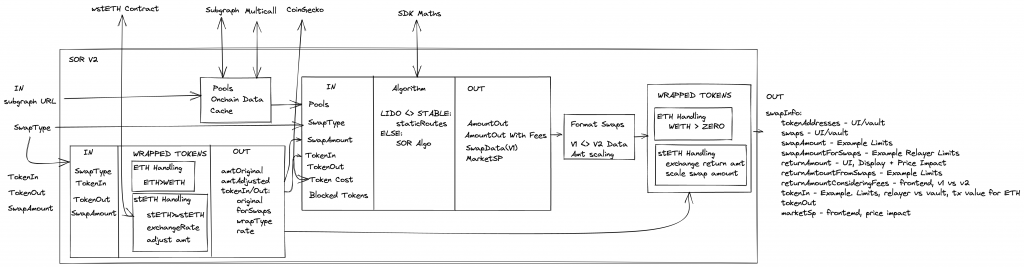
The diagram below shows some of the core parts of the SOR v2.

SOR v2

To choose the optimal routes for a swap the SOR needs information about the Balancer pools and the price of assets. And as we can see from the diagram the sourcing of this data is currently very tightly coupled to the SOR. Pools data is retrieved from the Subgraph and updated with on-chain balances using a multicall. And asset pricing is retrieved from CoinGecko.

Recently Beethoven experienced a pretty large growth spurt and found there were some major issues retrieving data from the Subgraph. They also correctly pointed out that CoinGecko doesn’t always have the asset pricing (especially on Fantom) and this information could be available from other sources.

After some discussions with Daniel (a very helpful dev from Beethoven) it was agreed that a good approach would be to refactor the SOR to create composability of data fetching so the user is able to have more control over where data is coming from. With this approach, the SOR doesn’t need to know anything about CoinGecko or the Subgraph and the data could now come from anywhere (database, cache, on chain, etc.), and as long as it implements the interface, the SOR will work properly.

Changes – SOR v3

I came back from Christmas break and Daniel had made all the changes – friendly forks for the win 💪! The interface changes are breaking but the improvements are worth it – SOR 3.0.0.

Config

The goal was to remove all the chain specific config from the SOR and pass it in as a constructor parameter. This helps to avoid non-scalable hard-coded values and encorages a single source of truth. It also gives more flexibility for the variables and makes the code easier to test.

There is now the SorConfig type:

export interface SorConfig {
    chainId: number;
    weth: string;
    vault: string;
    staBal3Pool?: { id: string; address: string };
    wethStaBal3?: { id: string; address: string };
    usdcConnectingPool?: { id: string; usdc: string };
}

Pool Data

The goal here is to allow for flexibility in defining where the pool data is fetched from. We define a generic PoolDataService that has a single function getPools, which serves as a generic interface for fetching pool data. This allows allow for any number of custom services to be used without having to change anything in the SOR or SDK.

export interface PoolDataService {
    getPools(): Promise<SubgraphPoolBase[]>;
}

Approaching it this way means all the Subgraph and on-chain/multicall fetching logic is removed from the SOR. These will be added to the Balancer SDK as stand-alone services. But as a simple example this is a PoolDataService that retrieves data from Subgraph:

export class SubgraphPoolDataService implements PoolDataService {
    constructor(
        private readonly chainId: number,
        private readonly subgraphUrl: string
    ) {}

    public async getPools(): Promise<SubgraphPoolBase[]> {
        const response = await fetch(this.subgraphUrl, {
            method: 'POST',
            headers: {
                Accept: 'application/json',
                'Content-Type': 'application/json',
            },
            body: JSON.stringify({ query: Query[this.chainId] }),
        });

        const { data } = await response.json();

        return data.pools ?? [];
    }
}

Asset Pricing

The goal here is to allow for flexibility in defining where token prices are fetched from. We define a generic TokenPriceService that has a single function getNativeAssetPriceInToken. Similar to the PoolDataService this offers flexibility in the service that can be used, i.e. CoingeckoTokenPriceService or SubgraphTokenPriceService.

export interface TokenPriceService {
    /**
     * This should return the price of the native asset (ETH) in the token defined by tokenAddress.
     * Example: BAL = $20 USD, ETH = $4,000 USD, then 1 ETH = 200 BAL. This function would return 200.
     * @param tokenAddress
     */
    getNativeAssetPriceInToken(tokenAddress: string): Promise<string>;
}

All the CoinGecko code is removed from the SOR (to be added to SDK). An example TokenPriceService using CoinGecko:

export class CoingeckoTokenPriceService implements TokenPriceService {
    constructor(private readonly chainId: number) {}

    public async getNativeAssetPriceInToken(
        tokenAddress: string
    ): Promise<string> {
        const ethPerToken = await this.getTokenPriceInNativeAsset(tokenAddress);

        // We get the price of token in terms of ETH
        // We want the price of 1 ETH in terms of the token base units
        return `${1 / parseFloat(ethPerToken)}`;
    }

    /**
     * @dev Assumes that the native asset has 18 decimals
     * @param tokenAddress - the address of the token contract
     * @returns the price of 1 ETH in terms of the token base units
     */
    async getTokenPriceInNativeAsset(tokenAddress: string): Promise<string> {
        const endpoint = `https://api.coingecko.com/api/v3/simple/token_price/${this.platformId}?contract_addresses=${tokenAddress}&vs_currencies=${this.nativeAssetId}`;

        const response = await fetch(endpoint, {
            headers: {
                Accept: 'application/json',
                'Content-Type': 'application/json',
            },
        });

        const data = await response.json();

        if (
            data[tokenAddress.toLowerCase()][this.nativeAssetId] === undefined
        ) {
            throw Error('No price returned from Coingecko');
        }

        return data[tokenAddress.toLowerCase()][this.nativeAssetId];
    }

    private get platformId(): string {
        switch (this.chainId) {
            case 1:
                return 'ethereum';
            case 42:
                return 'ethereum';
            case 137:
                return 'polygon-pos';
            case 42161:
                return 'arbitrum-one';
        }

        return '2';
    }

    private get nativeAssetId(): string {
        switch (this.chainId) {
            case 1:
                return 'eth';
            case 42:
                return 'eth';
            case 137:
                return '';
            case 42161:
                return 'eth';
        }

        return '';
    }
}

Final Outcome

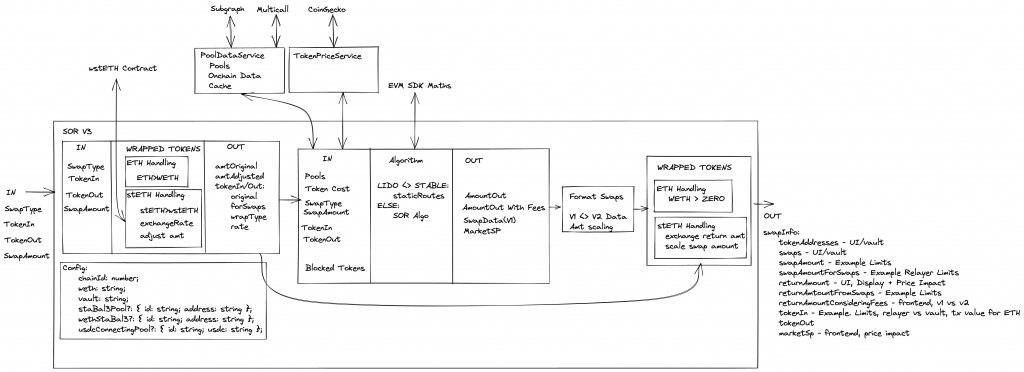
After the changes the updated diagram shows how the SOR is more focused and less opinionated:

The plan for the Balancer front-end is to move away from using the SOR directly and use it via the SDK package. The SDK will have the data fetching functionality as serparate services (which can be used independetly for fetching pools, etc) and these will be passed to the SOR when the SDK is instantiated. BUT it’s also possible to use the SOR independendtly as shown in this swapExample.

This was a large and breaking change but with the continued issues with Subgraph and more teams using the SOR/SDK it was a neccessary upgrade. Many thanks to Daniel from the Beethoven team for pushing this through!

Setting Up Testing – Typescript with Mocha/Chai

This is more a reminder post incase I ever have to do something like this again so its kind of boring!

For pure Javascript testing with Mocha/Chai:

$ yarn add mocha
$ yarn add chai

In package.json:

"scripts":{
    "test":"mocha"
}

Add a test dir:

$ mkdir test

Add first test file:

var expect  = require('chai').expect;
var request = require('request');

it('Main page content', function(done) {
    request('http://localhost:8080' , function(error, response, body) {
        expect(body).to.equal('Hello World');
        done();
    });
});

Now for Typescript:

$ yarn add typescript
$ yarn add ts-node --dev
$ yarn add @types/chai --dev
$ yarn add @types/mocha --dev

 Replace test script:

"test": "mocha -r ts-node/register test/*.spec.ts"

And make sure test is in root/test/example.spec.ts

import { expect, assert } from 'chai';
import 'mocha';
import { Pool } from '../src/types';
import { smartOrderRouter } from '../src/sor';
import { BigNumber } from '../src/utils/bignumber';
import { getSpotPrice, BONE } from '../src/helpers';

const errorDelta = 10 ** -8;

function calcRelativeDiff(expected: BigNumber, actual: BigNumber): BigNumber {
    return expected
        .minus(actual)
        .div(expected)
        .abs();
}

// These example pools are taken from python-SOR SOR_method_comparison.py
let balancers: Pool[] = [
    {
        id: '0x165021F95EFB42643E9c3d8677c3430795a29806',
        balanceIn: new BigNumber(1.341648768830377422).times(BONE),
        balanceOut: new BigNumber(84.610322835523687996).times(BONE),
        weightIn: new BigNumber(0.6666666666666666),
        weightOut: new BigNumber(0.3333333333333333),
        swapFee: new BigNumber(0.005).times(BONE),
    },
    {
        id: '0x31670617b85451E5E3813E50442Eed3ce3B68d19',
        balanceIn: new BigNumber(14.305796722007608821).times(BONE),
        balanceOut: new BigNumber(376.662367824920653194).times(BONE),
        weightIn: new BigNumber(0.6666666666666666),
        weightOut: new BigNumber(0.3333333333333333),
        swapFee: new BigNumber(0.000001).times(BONE),
    },
];

describe('Two Pool Tests', () => {
    it('should test spot price', () => {
        var sp1 = getSpotPrice(balancers[0]);
        var sp2 = getSpotPrice(balancers[1]);

        // Taken form python-SOR, SOR_method_comparison.py
        var sp1Expected = new BigNumber(7968240028251420);
        var sp2Expected = new BigNumber(18990231371439040);

        var relDif = calcRelativeDiff(sp1Expected, sp1);
        assert.isAtMost(
            relDif.toNumber(),
            errorDelta,
            'Spot Price Balancer 1 Incorrect'
        );

        relDif = calcRelativeDiff(sp2Expected, sp2);
        assert.isAtMost(
            relDif.toNumber(),
            errorDelta,
            'Spot Price Balancer 2 Incorrect'
        );
    });

    it('should test two pool SOR swap amounts', () => {
        var amountIn = new BigNumber(0.7).times(BONE);
        var swaps = smartOrderRouter(
            balancers,
            'swapExactIn',
            amountIn,
            10,
            new BigNumber(0)
        );

        // console.log(swaps[0].amount.div(BONE).toString())
        // console.log(swaps[1].amount.div(BONE).toString())
        assert.equal(swaps.length, 2, 'Should be two swaps for this example.');

        // Taken form python-SOR, SOR_method_comparison.py
        var expectedSwap1 = new BigNumber(635206783664651400);
        var relDif = calcRelativeDiff(expectedSwap1, swaps[0].amount);
        assert.isAtMost(relDif.toNumber(), errorDelta, 'First swap incorrect.');

        var expectedSwap2 = new BigNumber(64793216335348570);
        relDif = calcRelativeDiff(expectedSwap2, swaps[1].amount);
        assert.isAtMost(
            relDif.toNumber(),
            errorDelta,
            'Second swap incorrect.'
        );
    });

    it('should test two pool SOR swap amounts highestEpNotEnough False branch.', () => {
        var amountIn = new BigNumber(400).times(BONE);
        var swaps = smartOrderRouter(
            balancers,
            'swapExactIn',
            amountIn,
            10,
            new BigNumber(0)
        );

        // console.log(swaps[0].amount.div(BONE).toString())
        // console.log(swaps[1].amount.div(BONE).toString())
        assert.equal(swaps.length, 2, 'Should be two swaps for this example.');
        assert.equal(
            swaps[0].pool,
            '0x31670617b85451E5E3813E50442Eed3ce3B68d19',
            'First pool.'
        );
        assert.equal(
            swaps[1].pool,
            '0x165021F95EFB42643E9c3d8677c3430795a29806',
            'Second pool.'
        );

        // Taken form python-SOR, SOR_method_comparison.py with input changed to 400
        var expectedSwap1 = new BigNumber(326222020689680300000);
        var relDif = calcRelativeDiff(expectedSwap1, swaps[0].amount);
        assert.isAtMost(relDif.toNumber(), errorDelta, 'First swap incorrect.');

        var expectedSwap2 = new BigNumber(73777979310319780000);
        relDif = calcRelativeDiff(expectedSwap2, swaps[1].amount);
        assert.isAtMost(
            relDif.toNumber(),
            errorDelta,
            'Second swap incorrect.'
        );
    });

    // Check case mentioned in Discord
});

Photo by René Porter on Unsplash

TypeScript 1 – Getting Going & Migrating

I’m currently working on the Burner Signal project. So far I’ve created the React app that will hopefully be used as the proof of concept.

One problem – so far I’ve done everything in pure Javascript but there’s a strong desire to use TypeScript only.

Oh and another problem – I haven’t developed with TypeScript before! 🤔😂

But…this is a perfect opportunity to learn something new especially as the best way to learn something is to actually build something with it.

So after a bit of reading I do get what the proposed benefits of TypeScript are:

  • Because it uses Types and it transpiles to Javascript the compiler can catch errors – I can definitely see the benefits in this!
  • Using Types is a kind of self documentation
  • IDE integration – dev environments provide lots of TypeScript support which should make it more efficient and faster to develop

I will give it a shot and see if the above is true!

The first thing I need to do is get my current create-react-app which is using pure Javascript migrated to use TypeScript. It was surprisingly easy!

  1. yarn add typescript @types/node @types/react @types/react-dom @types/jest
  2. Change an existing .js file to use .jsx
  3. Restart server – this is important!
  4. That’s it!

Now to learn the basics of TypeScript. For this I’m using the React-TypeScript Cheatsheet and the first suggestion is to get familiar with TypeScript by following 2alitys guide which I’m working through next.